

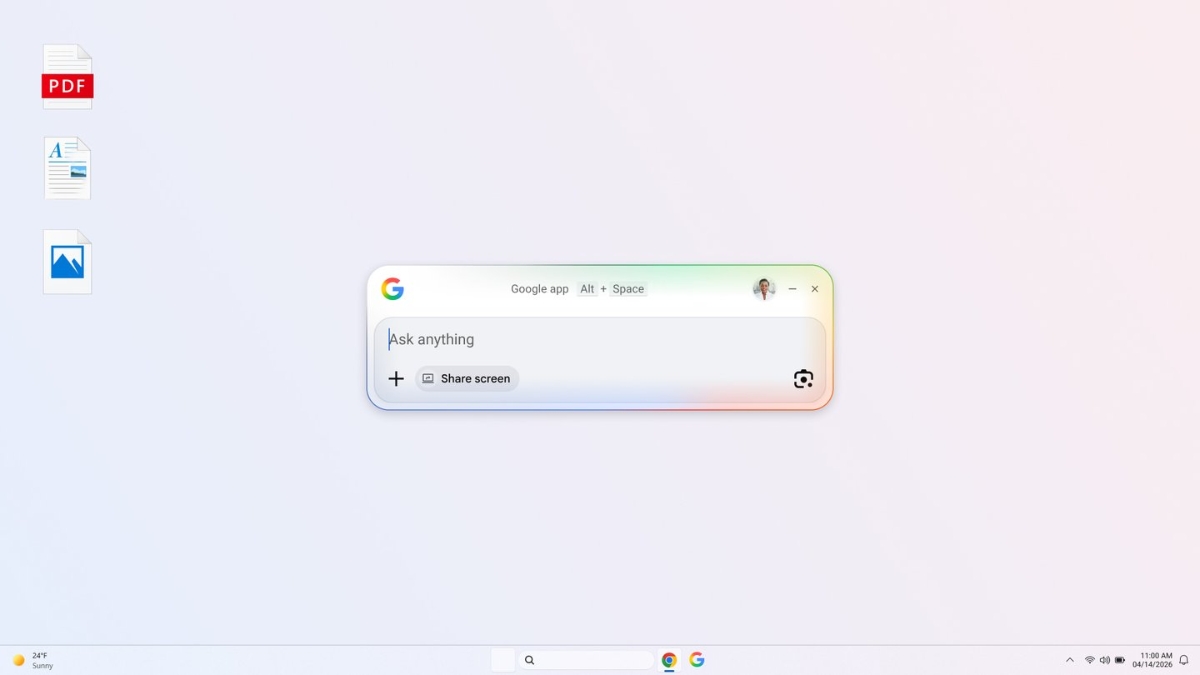
In a major update for users, Google has officially launched its Google app for desktop, now available for Windows users worldwide. The new app brings the power of Google Search directly to desktops, along with advanced AI features for a smarter and faster experience.
AI-Powered Search Now Built Into Desktop
The new Google desktop app comes with AI Mode, allowing users to ask questions and get intelligent, AI-generated responses along with relevant web links.
This means users can now:
- Get instant answers
- Explore topics in detail
- Access reliable web sources
All without opening a browser separately.
Quick Access With Simple Shortcut
One of the biggest highlights of the app is its ease of use.
With just a keyboard shortcut:
Alt + Space
Users can instantly search:
- Web results
- Files on their computer
- Installed apps
- Google Drive documents
This feature is designed to save time and improve productivity by keeping everything accessible in one place.
You May Like: BharatGPT Launch Date: Reliance Jio And IIT Bombay’s Joint AI Project!
Work Without Interruptions Using Screen Sharing
The app also introduces a screen sharing feature, allowing users to stay focused while working.
Users can:
- Select a specific window or the entire screen
- Continue asking questions without switching tabs
This helps maintain workflow and reduces distractions.
Search What You See With Google Lens
Another powerful feature is integration with Google Lens, which allows users to search anything visible on their screen.
With this, users can:
- Translate text from images
- Solve homework problems
- Identify objects or content instantly
It makes visual search faster and more practical directly from the desktop.
Designed for Speed and Convenience
The Google desktop app is built to help users quickly find what they need and return to their tasks without interruption. It combines search, AI, and productivity tools into a single, easy-to-use interface.
You May Like: Google’s Multifaceted AI Marvel: Introducing Gemini!
How to Get the Google Desktop App
The app is now available globally in English for Windows users. Interested users can download it from Google’s official platform and start using its features immediately.
Stay Updated With DigiHindNews
For the latest tech updates, app launches, and digital innovations, visit DigiHindNews.com regularly, bookmark the website for instant updates, and share this article to stay informed. Stay informed, stay ahead with DigiHindNews.com.
Add Digi Hind News as preferred source on Google for reliable and timely updates!